| Сегодня 19 марта, четверг |
      |
  
|

  
Какой рейтинг вас больше интересует?
|
Главная /
Каталог блоговCтраница блогера TUTSOFT - INFO BLOG/Записи в блоге |



 |
TUTSOFT - INFO BLOG
Голосов: 1 Адрес блога: http://tutsoft-info.blogspot.com/ Добавлен: 2012-04-05 23:56:43 блограйдером samopir |
Aiseesoft DVD Creator
2013-05-15 13:12:00 (читать в оригинале)
Aiseesoft DVD Creator
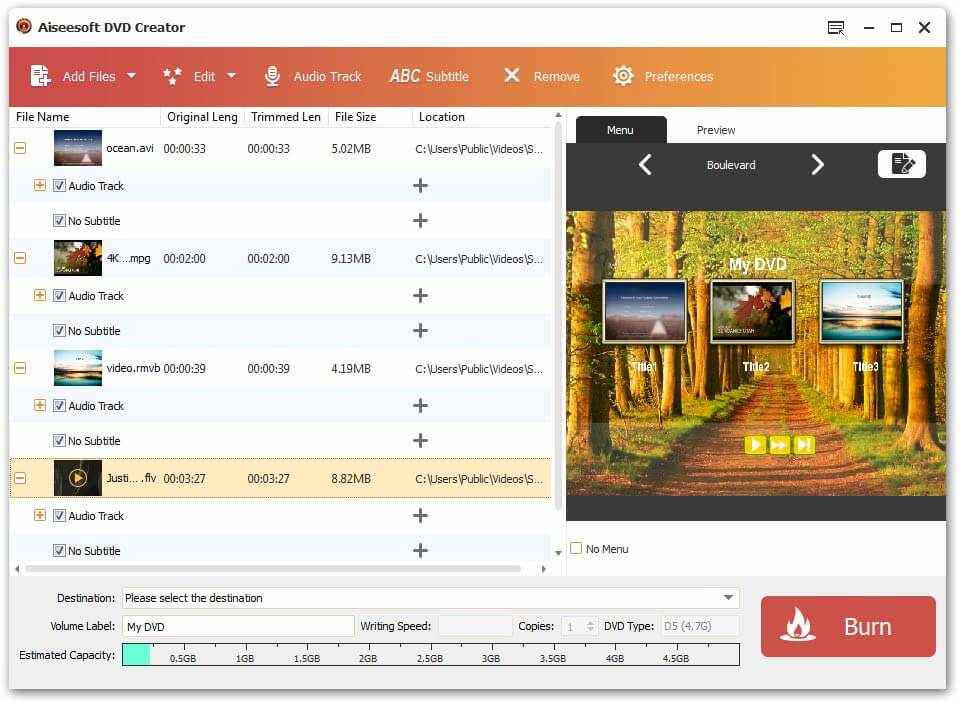
Aiseesoft DVD Creator can help users create DVD disc, DVD folder and DVD ISO files from TS, MTS, M2TS, TRP, TP, MGP, MPEG, MPEG-2, MPA, VOB, DAT, MP4, M4V, RM, RMVB, WMV, ASF, MKV, AVI, 3GP, 3G2, FLV, SWF, F4V, MPV, MOD, TOD, QT, MOV, DV, DIF, MJPG, MJPEG, NSV, WEBM video formats. Also it enables users to select the DVD menu templates, insert background music/pictures from local files to the menu, adjust video effect, crop the video screen size, trim the video, add the text/picture watermark, add audio tracks and subtitles to the target DVD. It newly support HTC One X, HTC Butterfly, Samsung Galaxy S4, Samsung Galaxy Tab 2, Nokia Lumia 920, BlackBerry Z10, Google Nexus 7, Motorola Droid Razr M, Kindle Fire HD and Asus Transformer Pad Infinity TF700.
Key Features
1. Edit the source video Aiseesoft DVD Creator provides users with powerful video editing functions. With it, users can clip the video to any time length segments by setting the start and end time, cut off unwanted playing areas of the video to fit different portable players, personalize the video with the image or text watermarks, even adjust the video brightness, saturation, contrast, hue, and volume.
2. Create stylish DVD menu This DVD Creator allows users to attach menus before burning. User can choose the perferred menu template, select the menu frame and button style, edit the menu text content and define its font, size and color, even add the background picture, music and opening film to the menu.
3. Add ans saudio track Users can choose the exciting audio track to the DVD and add your own audio track or background music to the DVD. Users are also alloed to adjust the volume, and choose audio encoder, bitrate and channels.
4. Add and edit subtitles You can add your own subtitle to the DVD, sign the subtitle with the language you choose, and adjust the subtitle position/font/size/color. The "Delay" function can make the subtitle sync with the audio track.
PowerPointPipe Replace for PowerPoint
2013-05-15 13:02:00 (читать в оригинале)
PowerPointPipe Replace for PowerPoint
Search and Replace multiple Microsoft PowerPoint presentations. Change hyperlinks and UNC paths when servers get renamed; update contact details such as names, addresses and phone numbers; translate presentations with find/replace lists; update Microsoft SharePoint documents or Microsoft Namespace Server mappings. Using PowerPointPipe is simple. 1) Drag and drop files from Windows Explorer to PowerPointPipe, or right-click the files or folders to process in Windows Explorer and choose PowerPointPipe.
2) Add one or more search/replace pairs.
3) Go! PowerPointPipe can change thousands or millions of presentations, and can make multiple changes simultaneously to save time. It automatically handles read-only files, passwords and other protection, and it can be automated to run overnight or over a weekend. No user interaction is required. It even includes restart recovery in case Microsoft PowerPoint crashes! PowerPointPipe offers many more search and replace options than Microsoft PowerPoint; such as hyperlinks, text boxes, shapes, document properties (such as Title, Subject, Author, Company etc) and more. EasyPatterns and Perl regex patterns can also be used. Unlike competing products, PowerPointPipe is fully Unicode compliant (allowing Find and Replace with international character sets), and can handle an unlimited number of presentations and find/replace pairs. PowerPointPipe can also update ISO-9001 version numbers. Try it today - and see why Microsoft recommends PowerPointPipe to its customers!
Aiseesoft 3D Converter
2013-05-15 12:56:00 (читать в оригинале)
Aiseesoft 3D Converter
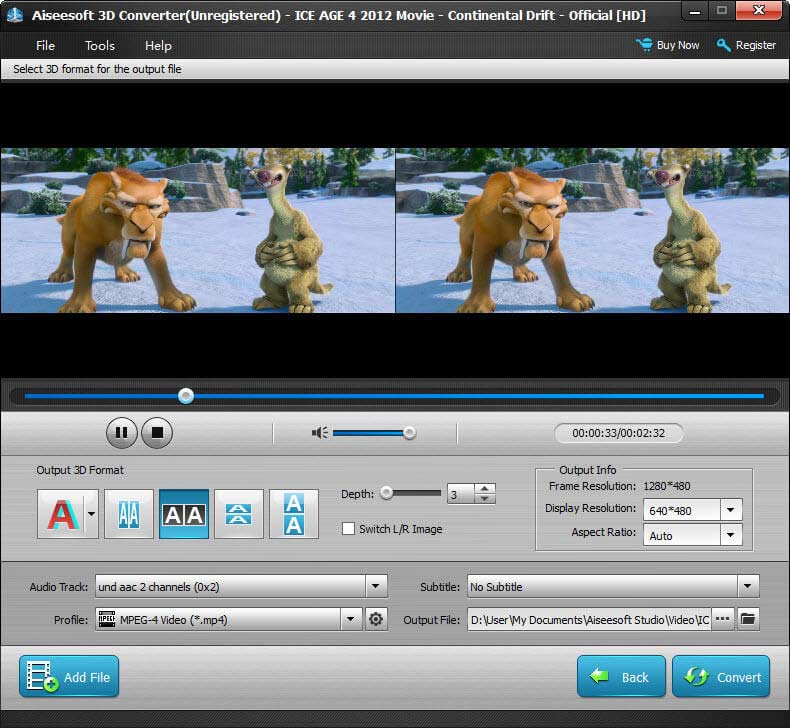
Aiseesoft 3D Converter is for converting SD/HD videos to five modes of 3D videos: Anaglyph, Side by Side, Side by Side (half-width), Top and Bottom, and Top and Bottom (half-height). The output 3D video files(MPG, MPEG-1, MPEG-2, MPEG-4, H.264, H.264/MPEG-4 AVC, DivX, XviD, AVI, FLV, MP4, M4V, MKV, MOV, 3GP, 3G2, MTV, SWF, WMV, ASF, DPG, TS, VOB, DV, AMV, WebM, HD video) can be played on popular multimedia devices such as iPhone 5, iPod Touch 5 and iPod Nano 7 and so on.
Key Functions
1. Convert SD/HD videos to 3D videos Aiseesoft 3D Converter can convert SD/HD videos, including MPG, MPEG-1, MPEG-2, MPEG-4, VOB, DAT, MP4, DivX, XviD, M4V, MTS, M2TS, RM, RMVB, WMV, ASF, MKV, AVI, 3GP, 3G2, F4V, FLV, SWF, MPV, TS, MOD, TOD, QT, MOV, DV, DIF, MJPG, MJPEG, TP, TRP, WebM, HD MTS, HD TS, HD M2TS, HD MPG, HD MPEG, HD MP4, HD WMV, HD QuickTime, HD MOV, to 3D videos.
2. Support five output 3D modes It supports five output 3D modes: Anaglyph (Red/Cyan), Side by Side, Side by Side (half-width), Top and Bottom, and Top and Bottom (half-height).
3. Convert 3D video to 2D video and among 3D videos This software can be used to convert 3D videos to all popular 2D video formats and convert 3D videos to other 3D modes.
4. Set parameters of the output videos Users is free to adjust the output video settings: resolution, bitrate, frame rate, encoder, aspect ratio, zoom mode and audio channels, sample rate, encoder, audio bitrate.
5. Output files can play on popular players Convert videos to popular multimedia devices: iPod, iPod classic, iPod touch, iPod nano, iPad, iPad 2, The New iPad, iPhone, iPhone 3G, iPhone 3GS, iPhone 4, iPhone 4S, iPhone 5, Apple TV, PSP, PS3, Windows Phone 7, Wii, Zune, HTC, Samsung, HTC One X, HTC Butterfly, Samsung Galaxy S4, Samsung Galaxy Tab 2, Nokia Lumia 920, BlackBerry Z10, Google Nexus 7, Motorola Droid Razr M, Kindle Fire HD and Asus Transformer Pad Infinity TF700.etc.
Aiseesoft Blu-ray Copy
2013-05-15 12:44:00 (читать в оригинале)
Aiseesoft Blu-ray Copy
Aiseesoft Blu-ray Copy is an easy-to-use Blu-ray clone/copy software, which enables users to copy Blu-ray disc/folder to a blank Blu-ray disc, and backup Blu-ray disc to hard drive by copying Blu-ray disc to Blu-ray folder and ISO files. Also it can help users copy the whole Blu-ray disc or just the main movie. After copying, the output Blu-ray could keep the original Blu-ray quality. Plus, after updated, it has been added iPhone 5 profile, and supports iPod Touch 5 and iPod Nano 7.

Key Functions
1. Copy BD to a blank Blu-ray disc Aiseesoft Blu-ray Copy allows you to copy all Blu-ray movie from a BD to a blank Blu-ray disc for backup.
2. Burn Blu-ray disc This software can easily burn local Blu-ray folder and ISO files to Blu-ray disc.
3. Copy Blu-ray disc/folder This copy software has the function to copy Blu-ray disc to hard drive as Blu-ray folder or ISO image files.
4. Select Blu-ray copy mode This software provides two copy modes – Full Copy and Main Movie. Users can choose any one according to your need.
5. Support almost all Blu-ray disc This powerful Blu-ray Copy supports most popular Blu-ray disc in both NTSC and PAL formats. It can copy your Blu-ray movie to any blank Blu-ray disc like BD-R, BD-RE, BD-R DL, BD-RE DL.
6. High Blu-ray copying speed This Blu-ray Copy can bring you super high converting speed to save your precious time.
7.Work with various devices Except iPhone devices, this software also works well with HTC One X, HTC Butterfly, Samsung Galaxy S4, Samsung Galaxy Tab 2, Nokia Lumia 920, BlackBerry Z10, Google Nexus 7, Motorola Droid Razr M, Kindle Fire HD and Asus Transformer Pad Infinity TF700.
Aiseesoft Blu-ray Player
2013-05-15 12:32:00 (читать в оригинале)
Aiseesoft Blu-ray Player
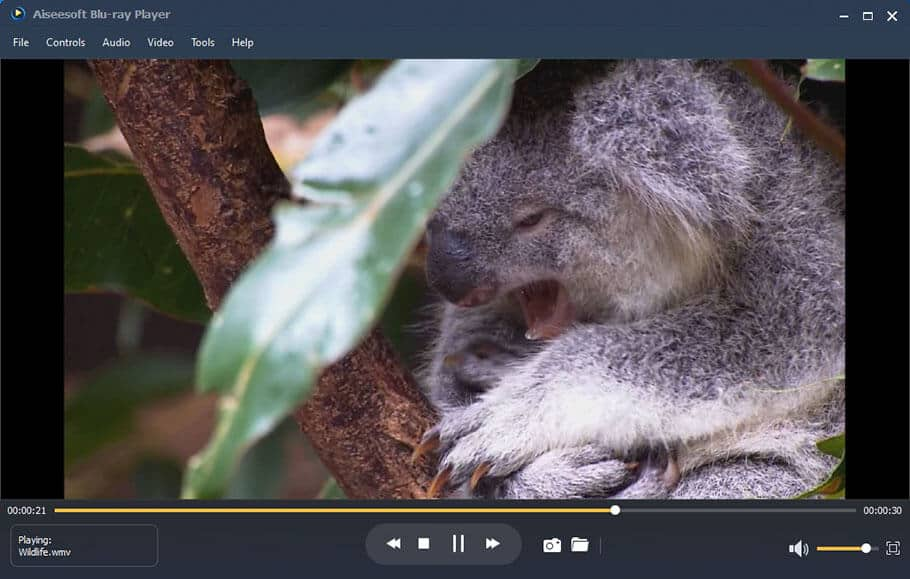
Aiseesoft Blu-ray Player can help users play Blu-ray disc, Blu-ray folder, ISO files, popular videos, including MPG, MPEG, MPEG2, VOB, DAT, MP4, M4V, TS, MTS, M2TS, MXF, WMV, RM, RMVB, ASF, MKV, AVI, 3GP, 3G2, F4V, FLV, SWF, MPV, MOD, TOD, QT, MOV, DV, DIF, MJPG, MJPEG, TP, TRP, WebM, HD video, with the perfect video quality. It is reliable and expert in playing Blu-ray discs released in different regions and dates trough simple clicks of mouse. Plus, after updated, it has been newly added playback menu of Blu-ray and DVD files.
Key Functions
1. Support playing any Blu-ray disc, Blu-ray folder and ISO files Aiseesoft Blu-ray Player can easily play any Blu-ray disc/DVD, Blu-ray folder and ISO image files. It is able to play Blu-ray discs chapter by chapter or title by title, and it allows to freely choose their preferred language, video quality, audio quality, audio effect, subtitles and more.
2. Compatible with any video files Except playing Blu-ray files, it can play any popular media files: MPG, MPEG, MPEG 2, VOB, DAT, MP4, M4V, TS, MTS, M2TS, MXF, RM, RMVB, WMV, ASF, MKV, AVI, 3GP, 3G2, F4V, FLV, SWF, MPV, MOD, TOD, QT, MOV, DV, DIF, MJPG, MJPEG, TP, TRP, WebM, HD videos includs HD AVI, HD ASF, HD H.264/MPEG-4 AVC, HD MKV, HD MOV, HD MPG, HD TS, HD WMV, HD MP4, HD WebM; AAC, AC3, AIFF, AMR, AU, FLAC, M4A, MKA, MP2, MP3, OGG, WAV, WMA.
3.1080P HD video visual effect This player provides users amazingl HD video watching experience. It can play any 1080p HD video with superior video quality. And the deinterlaced feature offers an effect of 1080p full HD even the movie is in 1080i.
4.Concise and Elegant interface This Blu-ray Player is easy to use beause the concise interface. Also you can change the screen size, switch chapters, and create snapshot.



Категория «Программы»
Взлеты Топ 5
 | ||
|
+557 |
564 |
Виктор Имантович Алкснис |
|
+548 |
625 |
Все для людей |
|
+520 |
561 |
krodico |
|
+519 |
560 |
sich |
|
+500 |
511 |
Выводы простого человека |
Падения Топ 5
 | ||
|
-2 |
15 |
dandr |
|
-6 |
11 |
Записки океанолога |
|
-7 |
12 |
Internet business in Ukraine |
|
-8 |
10 |
Markup |
|
-9 |
73 |
Кукуц Шмукуц |

Популярные за сутки
Загрузка...

BlogRider.ru не имеет отношения к публикуемым в записях блогов материалам. Все записи
взяты из открытых общедоступных источников и являются собственностью их авторов.
взяты из открытых общедоступных источников и являются собственностью их авторов.